
Appearance
Turbo Server
Use Turbo Server to deliver virtualized applications from your infrastructure to browsers and desktop clients.
What You'll Learn
- How Turbo Server fits into your application delivery stack
- Deployment options and core server roles
- Supported platforms and streaming capabilities
Overview
Turbo Server lets you publish and stream containerized applications to users without local installs or elevated privileges. Users launch apps from the web portal or native clients on Windows and macOS, and you keep delivery inside your environment.
Key benefits:
- Provide instant access to applications without local installation or reboots.
- Avoid client OS conflicts by running apps in isolated containers.
- Maintain administrative control by keeping delivery infrastructure on premises.
Deployment Options
Deploy Turbo Server on premises to retain full control of your environment, integrate with existing infrastructure, and apply your security controls. Review the setup guide for installation steps and prerequisites.
Architecture
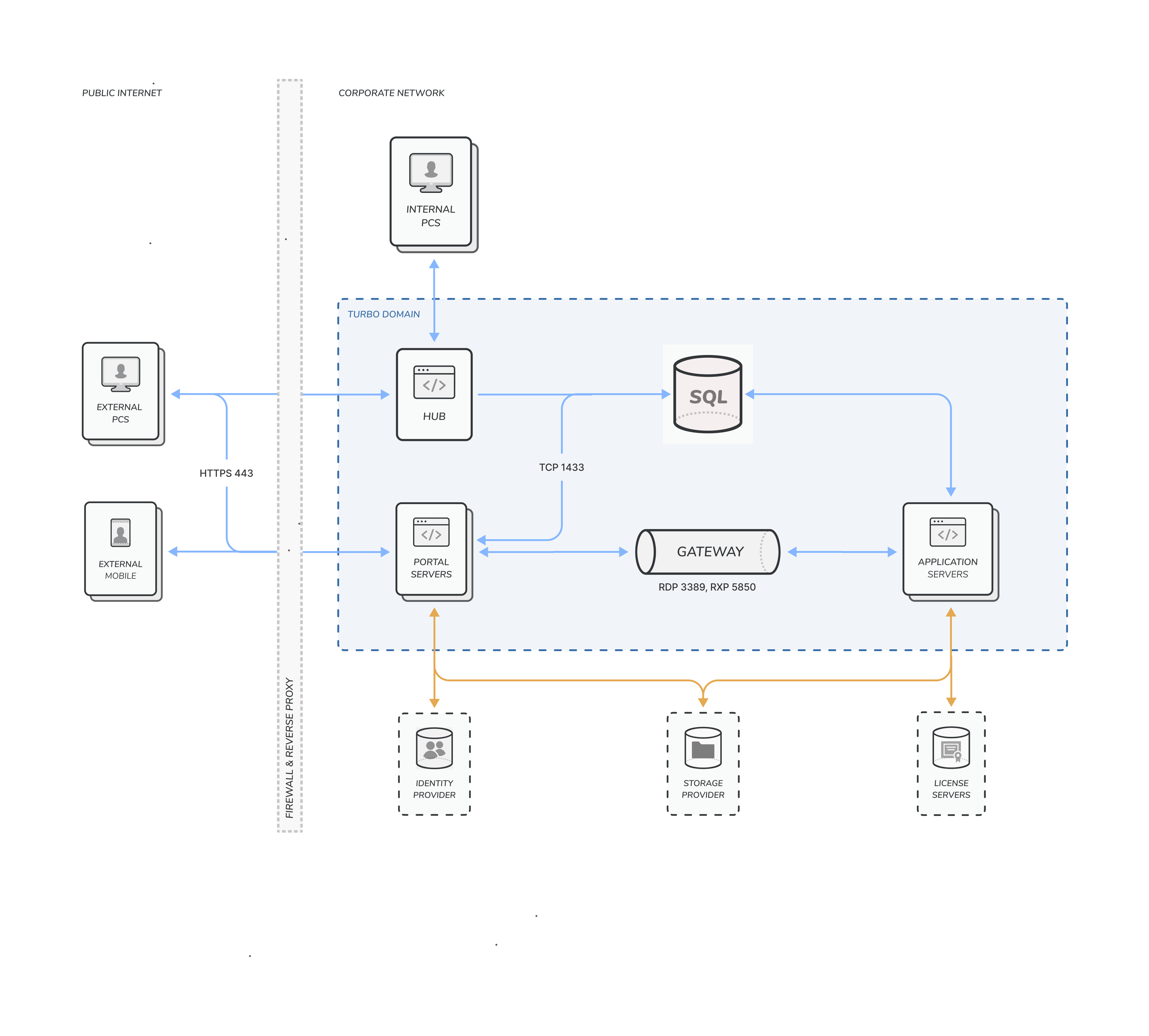
Turbo Server uses four primary roles:
- Hub Server: Store virtualized application images and user session data in your environment. You can federate hubs to share applications across sites.
- Portal Server: Host the web portal and API endpoints for authentication, application launch, and resource management.
- Application Servers: Run virtualized applications and stream user sessions. Use server pools to scale capacity and provide redundancy.
- Broker Service: Route client requests to the right application server and manage execution within the pool.
If you stream applications to external endpoints or third-party products, you only need a Hub Server or standard file server to provide the images.
Network Diagram
Technology
Application Streaming
Application servers run virtualized applications and stream the interface to client machines. Users can connect from Windows or macOS native clients or launch through HTML5 RDP streaming in modern browsers. Containerization increases user density and reduces maintenance compared to traditional remote desktop deployments.
Features
Turbo Server helps you:
- Host virtualized applications through the Turbo Server portal or third-party portals such as Microsoft SharePoint and IBM WebSphere.
- Provide a single access point to your application portfolio without installing software on every desktop.
- Launch applications quickly over the internet or intranet using standard web protocols.
- Support mobile and locked-down devices by streaming apps without requiring local administrative privileges.
- Run multiple application versions side-by-side without dependency conflicts.
- Keep legacy applications running on newer Windows releases, including Windows 10 and Windows 11.
Supported Platforms
Turbo Server supports the following host platforms:
- Microsoft Windows Server 2025
- Microsoft Windows Server 2022
- Microsoft Windows Server 2019
- Microsoft Windows Server 2016
- Microsoft Windows 11 Enterprise multi-session (Azure)
- Microsoft Windows 10 Enterprise multi-session (Azure)
Turbo Server requires x64 (64-bit) processor architectures.
End users can access Turbo Server from Microsoft Windows 11, Microsoft Windows 10, Microsoft Windows 8.1, Microsoft Windows 8, and Microsoft Windows 7. Turbo Portal Server supports Microsoft Edge, Chrome, Safari, Firefox, Opera, and other HTML5-compliant browsers.
::: note Internet Explorer 11 is partially supported by the server administration site and is not supported by the Portal dashboard. If you encounter issues with Internet Explorer 11 on the server administration site, disable compatibility mode, which forces Internet Explorer 7 emulation. :::